01
Choose your input path
Start on the home screen and choose Voice Notes or Manual Data Entry.
Nivium

Built For Simple Field Use
Use Voice Notes or Manual Data Entry to build a snow profile on your phone. Review it, save it, and share or print it when you are ready.
iPhone is available now. Android is still in testing. If you want free Android tester access, leave your name and email.
Voice Notes
“52 to 120 rounds one millimeter pencil plus. CT hard 28 taps resistant planar at 51.”
Finished Plotted Profile
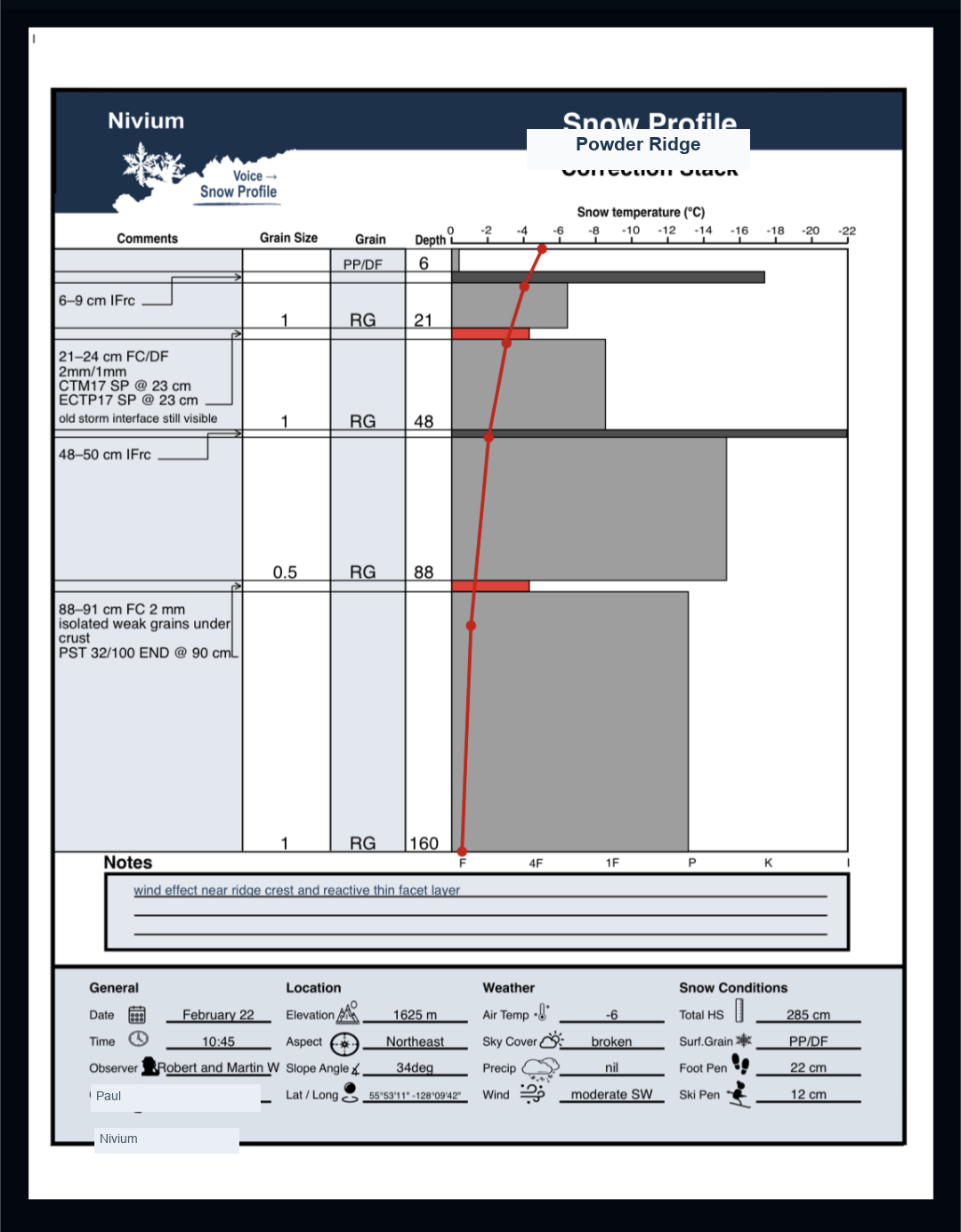
See Nivium In Action
Nivium gives you two simple ways to start: Voice Notes for speaking your observations and Manual Data Entry for entering them one section at a time.
Start on the home screen and choose Voice Notes or Manual Data Entry.
Speak your notes into the app or fill in the profile by hand. Nivium helps turn those observations into a clear draft.

Check the important details, generate the final snow profile, and save it to your archive for later sharing or printing.
For Snowpack Observations And Analysis
Voice record your observations or enter them manually step by step.
Check the important values before you create the final snow profile.
Save your observer name, organization, and elevation unit to make new profiles faster to start. Enter coordinates and elevation at the push of a button.
Manual Data Entry works offline. Voice recordings can be saved, and the profile can be drafted later when you have service again.
Pricing
Free
Paid
Nivium
Nivium